The Grey Zone: Where Authorization Issues Live
The Symptom
"User can't access the resource" — but is it a permission issue? Token configuration? Consent problem? MSAL integration error? Network trace shows cryptic error codes.
The Communication Gap
IAM admins say "app registration looks fine." Developers say "we're just calling MSAL." Each team has the right answer for their domain, but support tickets still bounce between them for days.
The Time Sink
Junior engineers escalate immediately. Mid-level engineers spend hours reading Microsoft docs. Senior engineers know the patterns — but debugging still takes too long.
The Solution
Learn the systematic troubleshooting framework that lets you map symptoms to root causes in minutes — whether you're an IAM admin, developer, or support engineer.
How You'll Solve Real Problems
Stop guessing. Start diagnosing with confidence.
Map Symptoms to Root Causes
Learn the diagnostic flowchart: Is it permissions? Token config? Missing app role? MSAL error?
Decode What's Really Happening
Inspect tokens, trace flows, and understand OAuth2/OIDC mechanics in minutes
Bridge the Communication Gap
Speak both IAM and developer language — collaborate more effectively across teams
Resolve Issues Significantly Faster
Apply systematic troubleshooting to reduce resolution time and handle more issues independently
Do Any of These Sound Familiar?
The Escalation Engineer
"I get tickets that say 'auth is broken' but I don't know where to start. Is it Entra ID config? App code? It takes multiple conversations with different teams to get clarity."
After this workshop: You'll have a diagnostic checklist that maps symptoms to root causes quickly and confidently.
The Frustrated Developer
"MSAL throws cryptic errors. IAM team says 'app registration is correct.' I've read 20 StackOverflow threads but still can't fix token issues."
After this workshop: You'll understand OAuth2 flows well enough to interpret MSAL errors and fix them yourself.
The Overloaded IAM Admin
"Developers keep requesting overly broad permissions without understanding the security implications. I have to push back, explain least privilege, and review every consent request manually."
After this workshop: Developers will understand permission scopes and make appropriate requests, reducing your review overhead.
Ideal for Teams Experiencing:
8 Focused Modules
Who Should Attend
- Developers integrating with Microsoft Entra ID
- Level 2/3 support engineers
- IAM architects & administrators
- Security engineers & compliance officers
- Technical consultants
- DevOps/Platform engineers
- Solution architects
Technical Depth
Intermediate to advanced level. Attendees should be comfortable with:
- Reading HTTP requests/responses
- Basic JSON structure and JWT concepts
- Authentication vs. authorization
- Web application development or troubleshooting
Not suitable for: Complete beginners or business stakeholders seeking high-level overview only.
Workshop Formats
-
Duration
8 hours (2× half-day) -
Delivery
Online (live virtual) -
Group Size
6-10 participants (optimal interaction) -
Hands-On
Live AppConfig² environment included - accessible 30 days after the workshop to test all workshop scenarios -
OAuth Companion App
Available to workshop attendees indefinitely after the workshop
Includes module overview, expected outcomes, pilot results, pricing, and booking details
Interactive Learning — Before, During & After
Every attendee gets access to the OAuth Workshop Companion — a React SPA built with
@azure/msal-browser that puts 10 interactive learning modules at your fingertips.
Sign in with any Microsoft Work, School, or Personal account.
- OAuth 2.0 History & Evolution
- Flow Decision Helper
- Flow Visualizer
- Endpoints & Flows Reference
- App Registration vs. Service Principal
- MSAL Under the Hood
- Microsoft Graph Reference
- SPA vs. Web App vs. Web API
- Permissions & Consent
- Token & Claims Validation
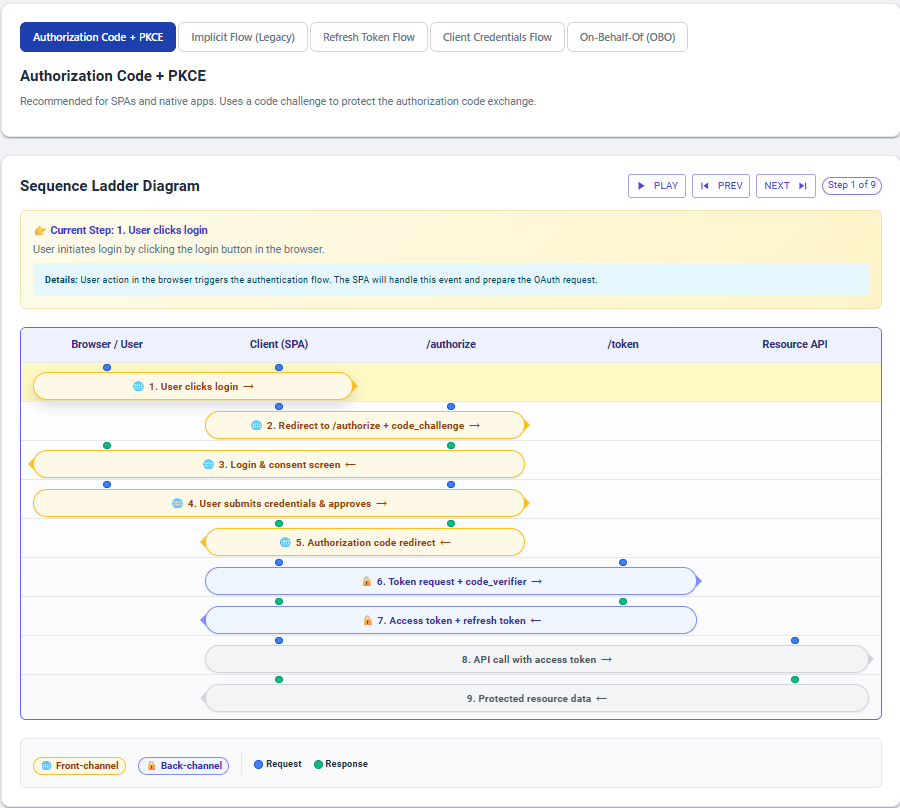
Flow Visualizer module — step-by-step animated sequence diagram for Authorization Code + PKCE
Why Choose Our Workshop
Tool-Integrated Learning
Use AppConfig² during exercises for real-world experience
Scenario-Based
Real authentication failures from enterprise support cases
Immediate ROI
Significantly reduce auth issue resolution time
Post-Workshop Support
30 days email Q&A included with every workshop
Tonino Filipović
Microsoft Identity Specialist & AppConfig² Suite Creator
Tonino brings over 25 years of hands-on experience in identity and access management, with deep expertise in Microsoft Entra ID, hybrid identity, and OAuth2 / OIDC protocols. As the architect behind AppConfig² Suite, he has solved numerous real-world authentication / authorization issues across enterprise environments.
His experience spans architecting IAM solutions for global organizations, troubleshooting complex authentication flows, and bridging the communication gap between IAM administrators and development teams. This workshop distills practical patterns from years of enterprise support cases and production deployments.
Areas of Expertise
- Microsoft Entra ID Architecture
- OAuth2 & OIDC Protocols
- Enterprise IAM Solutions
- Authentication Troubleshooting
- Security & Compliance
What You'll Walk Away With
Concrete skills you can apply Monday morning:
⚡ Triage auth issues systematically and efficiently
Problem: Support tickets sit for days bouncing between teams.
Solution: Use the diagnostic flowchart to map symptoms ("AADSTS errors", "missing claims", "consent loop")
to root causes (IAM config vs app code vs network) much faster.
🔍 Decode token issues more independently
Problem: "Token doesn't have the right claims" but you don't know why.
Solution: Inspect JWT structure, understand v1/v2 token differences, configure optional claims,
and validate token signatures with confidence.
🗣️ Communicate across teams confidently
Problem: IAM and dev teams talk past each other.
Solution: Understand both perspectives — know when to say "delegated vs application permissions"
and when to say "MSAL acquireTokenSilent() is failing."
🛠️ Fix OAuth2/OIDC flow issues independently
Problem: MSAL errors like "AADSTS65001" are cryptic.
Solution: Map error codes to flow stages (/authorize vs /token), understand redirect URIs,
and trace consent mechanics end-to-end.
📋 Audit app registrations for security gaps
Problem: Over-permissioned apps create security risks.
Solution: Review App Registration vs Service Principal relationships, apply least privilege,
and validate permission requests before granting consent.
📚 Build a troubleshooting playbook for your org
Problem: Every engineer reinvents the wheel when debugging auth.
Solution: Take home cheat sheets, flow diagrams, and real-world scenarios to train your team
and reduce repeat tickets.
What Teams Can Expect to Achieve
(conservative estimate)
60%+
Estimated reduction in auth issue resolution time*
5–10 hrs
Saved per engineer (assuming ~8–15 hours/month currently spent on auth issues)*
More Independent
Handle common auth issues with less escalation
*Conservative estimates based on expert experience and pilot feedback. Actual results vary by team maturity and issue frequency.
Tested with Real Development Teams
Results from our internal pilot with 8 developers and support engineers
8/8
Would recommend to their peers
~65%
Estimated reduction in auth issue resolution time
(based on team feedback)
4.7/5
Average relevance rating for daily work
"The Developer-IAM Interface module alone saved us hours of back-and-forth. We now have a checklist for what we need from IAM before starting any new integration."
— Senior Full-Stack Developer
Pilot Workshop Participant
"I've been debugging MSAL errors for 2 years. Finally understanding what's happening behind the scenes makes me much more confident in troubleshooting."
— Mid-Level Frontend Developer
Pilot Workshop Participant
"The 'Grey Zone' concept clicked immediately. Our L2 support team can now triage auth issues without escalating to architects every time."
— Support Engineer (L2)
Pilot Workshop Participant
Invest Your Saved Time Where It Matters
Reduce troubleshooting from hours to minutes and redirect that time to high-value activities
Improve Processes
Develop systematic troubleshooting playbooks, implement preventive measures, and create team knowledge bases
Mentor & Teach
Train junior engineers, conduct knowledge sharing sessions, and build organizational IAM expertise
Enhance Security
Focus on proactive security reviews, implement least privilege policies, and strengthen authentication architecture
Workshop Investment
Transparent pricing with team discounts — no hidden fees
Per Participant
All-inclusive — no additional costs
- 8 hours of expert-led training
- All 8 modules with hands-on exercises
- Complete slide decks & cheat sheets
- 30-day AppConfig² environment access
- 30 days post-workshop email Q&A
- Troubleshooting flow diagrams
Team & Loyalty Discounts
| Team of 8–10 | 15% off | €722 / person |
| Returning client (2nd+ workshop) | 15% off | stackable with team discount |
| Early bird (book 60+ days ahead) | 10% off | stackable with team discount |
Prices are per participant, excl. VAT where applicable. Mention applicable discounts when booking.
Frequently Asked Questions
No. While we use AppConfig² for demonstrations during the workshop, all troubleshooting techniques work with standard tools (Azure Portal, PowerShell, Microsoft Graph Explorer, JWT.io). The workshop teaches fundamental IAM concepts, not tool dependency.
The workshop is designed for technical professionals (developers, support engineers, IAM admins). We recommend attendees have at least intermediate understanding of web applications and HTTP. If your team includes junior members, consider pre-workshop prep materials (we can provide).
Yes. During booking, share your organization's common auth challenges. We can incorporate your scenarios into exercises while maintaining core workshop objectives. Custom scenarios work best with 8+ participant bookings.
- Complete workshop slide decks
- Troubleshooting flow diagrams and cheat sheets
- Hands-on exercise scenarios
- 30-day access to AppConfig² demo environment
- 30 days of email Q&A support
The workshop focuses specifically on Microsoft Entra ID (formerly Azure AD) and MSAL. While OAuth2/OIDC principles apply universally, examples and exercises use Microsoft's identity platform. Not suitable for AWS Cognito, Auth0, or Okta-specific implementations.
About This Workshop
This workshop is created by the same team that built AppConfig² Suite — experienced identity practitioners with deep expertise across legacy and modern authentication, from Kerberos to OpenID Connect. We built it to bridge the gap between IAM teams and developers so your organization stops losing hours in the grey zone.
LinkedIn GitHubReady to Resolve Grey Zone Issues Faster?
Stop losing hours on authentication problems. Book your workshop today!
Reserve Your Slot